1.
Banking & Card Linking
You can change your linked card through the VezoPay app by selecting your ring and updating the payment method.
To disconnect a card from your VezoPay ring, please follow these quick steps in the app:
– Open the app and navigate to the Manage Wearable tab.
– Select the option that says Remove Wearable.
Confirm the selection, and this will instantly remove both your card and the ring from your active profile.
Register your ring through the VezoPay app by following the on-screen instructions.
Registration and activation are two distinct steps in setting up your VezoPay ring. Registration securely links your bank card to the device using a token generated through Visa and Mastercard’s secure payment networks. You will be prompted to register your ring through pre-registration on the VezoPay website or in the VezoPay app during self-registration.. Activation is the final step, where you authenticate through third-party OTP and banking app verification to make your wearable live and ready for payments.
We are currently live with FNB, RMB and Investec, If you bank elsewhere, please join our waiting list on vezopay.com/vezopay-waiting-list/. We are working hard to onboard more banks, and you’ll be the first to know the moment we launch with others.
2.
Device Information & Functionality
The ability to connect a payment card to your Vezo wearable depends on your bank. If your bank has activated VezoPay, then your payment card can be connected. Visit our supported payment cards page to check if your card is compatible. If your bank has not yet enabled Vezo, don’t worry! Our team is actively working to onboard all major banks in South Africa. In the meantime, you can open an account with one of the current banks that have enabled Vezopay.
Yes, there’s no limitation to how many wearables you can connect your card to. You can also manage and pause your multiple wearables in the Vezopay app
As long as your bank, listed on our website, supports Vezopay and your account and card are active, you will be able to add your card to any Vezo wearable.
Yes, as long as the terminal supports Visa or Mastercard contactless payments. You can tap and pay with your Vezo wearable at any Visa or Mastercard contactless terminal worldwide.
All limits and restrictions are controlled by your bank, the same way as with your physical payment card.
Yes. Pausing payments on your Vezo wearable does not affect your physical payment card; you can continue to use it as usual.
No, blocking your physical payment card also blocks the wearable from making payments.
The requirement to enter a PIN depends on your bank’s policies and the transaction amount, regardless of whether you pay with your physical card or your Vezo wearable. In South Africa, most banks enforce a limit of R500 before requiring users to enter their PIN at POS terminals. Additionally, payments made in new or suspicious locations may trigger the bank’s PIN limit as a fraud prevention measure
Once you have set-up your device or activated it with your phone. Thereafter it’s completely stand alone, never has to be charged or near a phone, unless you would like to change or pause the card linked to your device at a later stage.
Your Vezo Pay transactions will appear on your bank statement alongside your physical card transactions. VezoPay does not store any personal information, transactions, credentials, or bank card details during use, registration or activation on the app or website for absolute security.
Your physical card linked to this device has been transformed into an encrypted token. As a result, you may be required to present your physical card linked to your ring, along with the necessary receipts, to the merchant when processing a return. If you encounter any issues, please contact your bank for further assistance.
Registration Step: When you order your Vezo wearable online, you will be prompted to connect a payment card through Fidesmo, a third-party European PCI DSS Visa & Mastercard approved token requester. This is what we call the “registration step,” in which an encrypted token is assigned to your card. None of your credentials are stored by Vezo and are only passed through our trusted partner, Fidesmo. Encrypted Token: The wearable will be shipped to you with an encrypted, inactive token that represents your payment card. This token hides your credentials and is ready to be activated. Activation: Only the owner of the payment credentials can activate the device using their app. Third-party OTP (One-Time Password) authentication via SMS and your bank’s banking app are required to activate your wearable, ensuring the utmost security.
Users sync their bank card to the VezoPay app, which then assigns an encrypted Visa or Mastercard token to the ring. Payments are made by tapping the ring on a contactless terminal, ensuring secure and seamless transactions.
No, initially Vezo-connected wearables will only support one payment card at a time.
Yes, VezoPay rings are waterproof and can be used while swimming or engaging in water sports. Important Note: Fingers tend to shrink in cold water, which may cause your ring to become loose. If you plan to swim regularly with your VezoPay ring, we recommend selecting a snug fit to ensure it stays securely in place.
Tokentization is VezoPay’s proprietary process for tying unsecured digital assets to a secure digital element, ensuring a trusted and immutable connection.
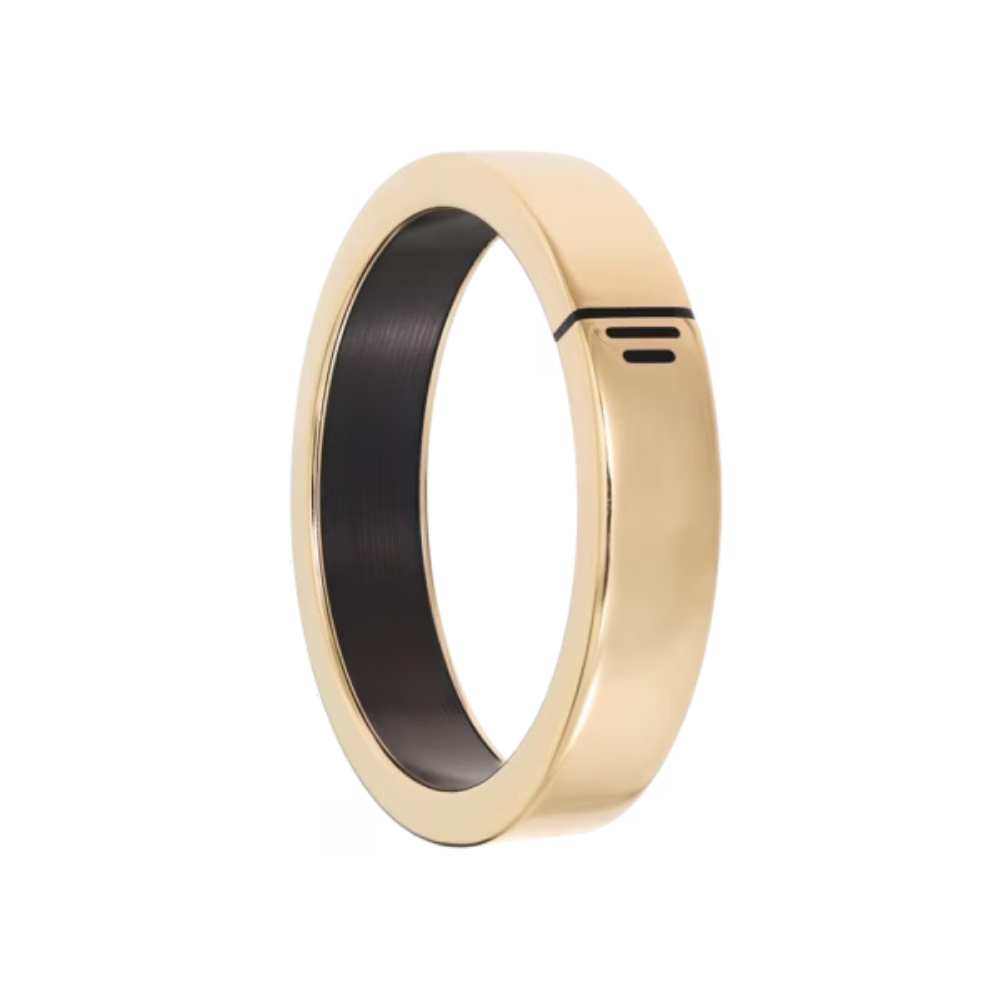
A secure, passive payment wearable that functions like a digital wallet but never needs charging. Powered by electromagnetic waves from terminals, it securely transmits encrypted payment data. Users sync their bank card to the VezoPay app, which then assigns an encrypted Visa or Mastercard token to the ring.
This means your card issuer (Bank) has not enabled the payment card for use with Vezo Pay. Check our supported payment cards page to see if your card is compatible. If your bank has not yet enabled Vezo, don’t worry! Our team is actively working to onboard all major banks in South Africa. In the meantime, you can open an account with one of the current banks that have enabled Vezopay.
Absolutely! Your device will work seamlessly at any of the 37 million Visa or Mastercard terminals worldwide. While you may need to notify your bank about your travel plans due to their security protocols, there are no extra steps required on the Vezo side. Once your card is set up, you’re ready to go. Enjoy hassle-free, stylish travel with Vezo!
No, Vezo cannot see where or when you make a purchase with Vezo Pay, nor what you are purchasing. Vezo can only see that there is an email address associated with a connected payment card. VezoPay does not store any personal information, transactions, credentials, or bank card details during ring payments, registration or activation on the app or website for absolute security.
3.
Device Management & Account Security
After registration, follow these steps in the VezoPay app to link your payment card: Open the VezoPay app on your Android or iPhone. Navigate to the overview screen displaying your wearable and connected services. Click the “Activate payment card” button under the payment card image. Follow the on-screen instructions to complete activation. If you have already connected a payment card to your wearable (for example, using online registration), you can activate it for payments using our Android app, iPhone app, by following these steps: Note: If you have not yet connected a payment card, follow the provided instructions on “How to connect/register a payment card to my wearable” instead. Ensure your wearable is connected through the VezoPay app or website before proceeding. Android / iPhone Activation Go to the dashboard screen showing your wearable and the services connected to it. Click the “Activate payment card” button under the payment card image. Follow the instructions on screen to activate the payment token on your wearable.
You can temporarily disable your ring through the VezoPay app by selecting the “Pause” option under device settings. To access device/card settings, press on the device icon from the dashboard. If your device doesn’t appear in the app, no problem! Simply tap the plus (+) icon to add a device. Follow the on-screen instructions by placing your phone near the ring to connect it. Once your device appears, you can proceed with the steps to pause your ring/payments.
Immediately pause or block your ring via the VezoPay app or through contacting your bank. Since no credentials are stored on the device, your data remains protected. If you’re unable to access your phone or mobile device, contact your bank and request them to stop or block your VezoPay token. This action will immediately lock your ring and prevent any unauthorized transactions on your wearable. Important: Never share your OTP or banking credentials with anyone. Vezo representatives will never ask for an OTP or request your bank details under any circumstances.
4.
NFC & Connectivity
NFC is a transmission technology, and its security depends on the services that utilize it. At Vezo, we ensure security by using encryption with applets and keys embedded in the wearable, approved by Visa and Mastercard, to establish a secure communication channel. Additionally, Vezo does not store your actual card details on the NFC chip. Instead, an encrypted token is assigned to represent your card, ensuring your credentials are never stored or transmitted. This means that even if someone intercepts the wireless transmission, the data remains secure. Our NFC devices are passive (they don’t require a battery), which adds another layer of security. Since they are offline devices, they cannot be hacked remotely or online, making them inherently more secure than active, connected devices. This approach is commonly used in industries like payments, transport, and access control.
NFC (Near Field Communication) is a short-range wireless technology used for contactless payments. NFC is a transmission technology, and its security depends on the services that utilize it. At Vezo, we ensure security by using encryption with applets and keys embedded in the wearable, approved by Visa and Mastercard, to establish a secure communication channel. Additionally, Vezo does not store your actual card details on the NFC chip. Instead, an encrypted token is assigned to represent your card, ensuring your credentials are never stored or transmitted. This means that even if someone intercepts the wireless transmission, the data remains secure. Our NFC devices are passive (they don’t require a battery), which adds another layer of security. Since they are offline devices, they cannot be hacked remotely or online, making them inherently more secure than active, connected devices. This approach is commonly used in industries like payments, transport, and access control.
When self registering your device on an iPhone, additional steps are required due to iPhone’s restricted NFC policies, which can sometimes cause difficulties. These extra steps involve approving the 10-step write process at multiple stages, so please be patient and wait for each step to complete before clicking “Connect NFC” or continuing as prompted. The entire writing process may take up to one minute. To ensure smooth card connection and registration, please follow these guidelines: Ensure your phone and ring are positioned correctly during the writing process. Use the VezoPay special box to hold your ring in the correct position for optimal NFC connection and writing. Do not move your phone away until the process is complete. Please follow the steps in the user manual, quick setup guide, or app. For more detailed instructions and troubleshooting for iOS setup, check out our helpful video guides [here]. If the issue persists, please contact our support team for further assistance. NFC and Chip Information What does NFC stand for? NFC stands for Near Field Communication, a technology that evolved from radio frequency identification (RFID). An NFC chip operates as part of a wireless link, enabling devices to communicate when in close proximity.
5.
Ordering, Returns & Delivery
VezoPay wearables are available on the VezoPay website, simply order online and have your device delivered to your door.
You can purchase multiple VezoPay rings. Each ring can be linked to a compatible bank card through the VezoPay app, allowing you to manage multiple payment devices. However, it’s important to note that each ring can only be linked to one bank card at a time. You are able to link multiple rings to the same bank card.
There can only be one active card on the ring at a time. You can easily change which card is loaded onto your ring in the VezoPay app.
VezoPay Rings are Available! We have launched with FNB and Investec. If you bank elsewhere, please join our waiting list on vezopay.com/vezopay-waiting-list/. We are working hard to onboard more banks, and you’ll be the first to know the moment we launch with others.
After registration, follow these steps in the VezoPay app to link your payment card: Open the VezoPay app on your Android or iPhone. Navigate to the overview screen displaying your wearable and connected services. Click the “Activate payment card” button under the payment card image. Follow the on-screen instructions to complete activation. If you have already connected a payment card to your wearable (for example, using online registration), you can activate it for payments using our Android app, iPhone app, by following these steps: If your device doesn’t appear in the app, no problem! Simply tap the plus (+) icon to add a device. Follow the on-screen instructions by placing your phone near the ring to connect it. Once your device appears, you can proceed with the steps to activate/pause/delete your ring/card. Note: If you have not yet connected a payment card, follow the provided instructions on “How to connect/register a payment card to my wearable” instead. Ensure your wearable is connected through the VezoPay app or website before proceeding. Android / iPhone Activation Go to the dashboard screen showing your wearable and the services connected to it. Click the “Activate payment card” button under the payment card image. Follow the instructions on screen to activate the payment token on your wearable.
Block payments on your ring immediately by logging onto your app and clicking “pause payments. Ïf you do not have your device contact your bank, and they will assist you in blocking the wearable to prevent unauthorized transactions. Important: Never share your OTP or banking credentials with anyone. Vezo representatives will never ask for an OTP or request your bank details under any circumstances.
To change or disconnect a payment card, use the VezoPay app on an NFC-compatible device to select your wearable, remove the existing card token, and then follow the prompts to link a new payment method.
You can temporarily disable your ring through the VezoPay app by selecting the “Pause” option under device settings. To access device/card settings, press on the device icon from the dashboard. If your device doesn’t appear in the app, no problem! Simply tap the plus (+) icon to add a device. Follow the on-screen instructions by placing your phone near the ring to connect it. Once your device appears, you can proceed with the steps to pause your ring/payments.
Registering your device refers to linking your bank card to a secure token that gets assigned to your device through Visa and Mastercard secure rails. You will need to input your card details during this registration/setup process. You will be prompted to register your ring through pre-registration on the VezoPay website or in the VezoPay app during self-registration. VezoPay app by following the on-screen instructions. Note: VezoPay does not store any personal information, credentials, or bank card details during registration. VezoPay operates in partnership with Fidesmo, a European token requester compliant with PCI DSS standards. Fidesmo utilizes advanced encryption protocols, ensuring the highest level of security when registering or activating your device. Important: Never share your OTP or banking credentials with anyone. Vezo representatives will never ask for an OTP or request your bank details under any circumstances
Registering your ring involves securely linking your bank card to the device using a secure token generated through Visa and Mastercard’s secure payment networks. You’ll need to enter your card details during the registration process. Where to Register: Pre-registration: Complete the process on the VezoPay website. Self-registration: Use the VezoPay app by following the on-screen instructions to set up your ring. Key Security Notes: VezoPay does not store personal information, card details, or credentials during registration. VezoPay partners with Fidesmo, a European token requester compliant with PCI DSS standards, using advanced encryption for secure activation. Important: Never share your OTP or bank credentials with anyone. VezoPay representatives will never request this information. Enjoy peace of mind with secure, seamless registration for your Vezopay device.
To remove your card, open the VezoPay app and tap on your device icon to select your ring. Then, choose the option to unlink or delete your card. If your device doesn’t appear in the app, no problem! Simply tap the plus (+) icon to add a device. Follow the on-screen instructions by placing your phone near the ring to connect it. Once your device appears, you can proceed with the steps to remove your card.
You’ll receive an exclusive email invitation, granting you the opportunity to order your VezoPay ring effortlessly. Once ordered, your ring will be delivered straight to your doorstep—bringing seamless, contactless payments to you without ever needing to step outside.
Once you purchase a VezoPay ring, the transaction limits are determined by your bank’s policies. Typically, contactless payments up to R500 can be made without a PIN; transactions exceeding this amount will require PIN entry for added security.
Activating your VezoPay ring completes the setup process and enables your linked card for payments. This is done by completing OTP verification and in-app authentication with your bank. Activation is a critical security step—it ensures your device is protected from unauthorized transactions. Until activation is complete, your ring cannot be used for payments, keeping it secure by default. Important: Never share your OTP or bank credentials with anyone. VezoPay representatives will never request this information. Troubleshooting When trying to remove a payment card, I receive the error message: “Email doesn’t match the one set for the connected payment card.” To remove the payment card, you must provide the same email address you used when initially connecting the payment card during the registration process which would have taken place through pre-registration on the VezoPay website or in the VezoPay app during self-registration. If you’re unsure of the email address used, please contact your bank for assistance or contact Vezo support who will guide you through the next steps .
If your device doesn’t appear in the app, no problem! Simply tap the plus (+) icon to add a device. Follow the on-screen instructions by placing your phone near the ring to connect it. Once your device appears, you can proceed with the steps to activate/pause/delete your ring/card.
You can purchase your VezoPay wearable on the VezoPay website and have it delivered right to your door.
We have launched with FNB and Investec. If you bank elsewhere, please join our waiting list on vezopay.com/vezopay-waiting-list/. We are working hard to onboard more banks, and you’ll be the first to know the moment we launch with others.
You will need to input your card details during the initial setup process. This may occur during your device’s pre-registration in the VezoPay app during self-registration. Important: Never share your OTP or banking credentials with anyone. Vezo representatives will never ask for an OTP or request your bank details under any circumstances
This means your card issuer (Bank) has not enabled the payment card for use with Vezo Pay. Check our supported payment cards page to see if your card is compatible. If your bank has not yet enabled Vezo, don’t worry! Our team is actively working to onboard all major banks in South Africa. In the meantime, you can open an account with one of the current banks that have enabled Vezopay. Payment Limits and Restrictions All limits and restrictions are controlled by your bank, the same way as with your physical payment card. Contact your bank for options. Wearable Compatibility
Typically, once you’ve confirmed your size, we move pretty fast to get that ring onto your finger. For most local orders in SA, you can expect your delivery within 2 to 5 business days.
For most local orders in SA, you can expect your delivery within 2 to 5 business days.
VezoPay Rings are Available! We have launched with FNB and Investec. If you bank elsewhere, please join our waiting list on vezopay.com/vezopay-waiting-list/. We are working hard to onboard more banks, and you’ll be the first to know the moment we launch with others.
We are currently live with FNB, RMB and Investec, If you bank elsewhere, please join our waiting list on vezopay.com/vezopay-waiting-list/. We are working hard to onboard more banks, and you’ll be the first to know the moment we launch with others.
VezoPay is currently in the reservation phase, you are able to add a ring to the basket and reserve your selection. The reservation period will end in the next few months. After that, reserved customers will be invited to purchase their rings and join the exclusive open Beta—getting their rings first! Soon after, the public will have the chance to buy their own. Reserve your ring now and stay tuned to our socials for your early access and further information.
6.
Payments & Transactions
Vezopay is free to use—there are no transaction or account fees when you pay with our devices. Your bank may still charge its usual fees, but Vezo only charges for the device itself.
No, VezoPay is free to use—there are no transaction or account fees when making payments with our devices. However, your bank may apply its standard fees. Vezo only charges for the device itself.
Simply hold your hand near a contactless terminal and wait for the transaction to process Use the correct Knock-to-Pay (K2P) method: Hold your hand in a fist as if knocking on a door. Gently tap or hover your fist near the NFC logo on the terminal (1 to 3 cm). Hold steady until the payment is confirmed. For detailed K2P instructions, refer here. Check out our K2P (Knock2Pay) “How-To” video here: https://staging.vezopay.com/tutorials/#k2pvideo
The requirement to enter a PIN depends on your bank’s policies and the transaction amount, regardless of whether you pay with your physical card or your Vezo wearable. In South Africa, most banks enforce a limit of R500 before requiring users to enter their PIN at POS terminals. Additionally, payments made in new or suspicious locations may trigger the bank’s PIN limit as a fraud prevention measure
No, once activated, the ring operates independently and does not require a phone, Wi-Fi, Bluetooth, or charging. You’ll only need your phone if you wish to change, delete, or pause the card linked to your device in the future.
The requirement to enter a PIN depends on your bank’s policies and the transaction amount, regardless of whether you pay with your physical card or your Vezo wearable. In South Africa, most banks enforce a limit of R500 before requiring users to enter their PIN at POS terminals. Additionally, payments made in new or suspicious locations may trigger the bank’s PIN limit as a fraud prevention measure
Vezopay is free to use—there are no transaction or account fees when you pay with our devices. Your bank may still charge its usual fees, but Vezo only charges for the device itself.
Your physical card linked to this device has been transformed into an encrypted token. As a result, you may be required to present your physical card linked to your ring, along with the necessary receipts, to the merchant when processing a return. If you encounter any issues, please contact your bank for further assistance.
Simply hold your hand near a contactless terminal and wait for the transaction to process Use the correct Knock-to-Pay (K2P) method: Hold your hand in a fist as if knocking on a door. Gently tap or hover your fist near the NFC logo on the terminal (1 to 3 cm). Hold steady until the payment is confirmed. For detailed K2P instructions, refer here. Check out our K2P (Knock2Pay) “How-To” video here: https://staging.vezopay.com/tutorials/#k2pvideo
Vezopay is free to use—there are no transaction or account fees when you pay with our devices. Your bank may still charge its usual fees, but Vezo only charges for the device itself.
Confirm terminal compatibility:
Ensure the payment terminal supports contactless payments. You can test this by making a transaction with a contactless payment card. Check your VezoPay app:
Verify that your linked card is active and properly set up. Use the correct Knock-to-Pay (K2P) method: Hold your hand in a fist as if knocking on a door. Gently tap or hover your fist near the NFC logo on the terminal (1 to 3 cm). Hold steady until the payment is confirmed. For detailed K2P instructions, refer here. If the issue persists, please contact the VezoPay support team for assistance. The transaction is always rejected. The payment card linked to your Vezo wearable is associated with the same account as your physical payment card therefore: Ensure that your account has sufficient funds and that your card is active/not expired. If issues persist, contact your bank for further assistance.
Check terminal compatibility:
Ensure the terminal supports contactless payments. Test it by making a transaction with a contactless payment card to confirm its functionality. Verify your account status: The payment card linked to your Vezo wearable is associated with the same account as your physical payment card. Ensure your account has sufficient funds and that your card is active and not expired. Check your VezoPay app:
Confirm that your linked card is active and properly configured. Use the correct Knock-to-Pay (K2P) method: Form a fist as if knocking on a door. Gently tap or hover your fist near the NFC logo on the terminal (1 to 3 cm). Hold steady until payment confirmation occurs—don’t pull away too soon. If the problem persists, contact your bank for assistance or reach out to VezoPay support.
Simply hold your hand near a contactless terminal and wait for the transaction to process Use the correct Knock-to-Pay (K2P) method: Hold your hand in a fist as if knocking on a door. Gently tap or hover your fist near the NFC logo on the terminal (1 to 3 cm). Hold steady until the payment is confirmed. For detailed K2P instructions, refer here. Check out our K2P (Knock2Pay) “How-To” video here: https://staging.vezopay.com/tutorials/#k2pvideo
7.
Security & Fraud Protection
No, the ring operates entirely offline and is encrypted with a secure token.
No, a thief cannot skim your data, and here’s why: 1. No Visible Information: Unlike physical or virtual cards, your ring doesn’t have your name, card number, or CVV written on it. It looks just like a regular ring. 2. Invisible Credentials: Your actual card details aren’t stored on the ring. Instead, we use a process called tokenization. We assign a Visa or Mastercard token to your ring. Even if a thief tried to skim the data, all they would get is a random string of digits from our token, which is useless without the real credentials. This is the magic of tokenization, keeping your information safe and secure.
While someone can physically take your ring, they cannot use it above a pre-set limit without knowing your card’s pincode. Additional security measures like card suspension/disable in the app enhance protection. User credentials are hidden by a secure token and no identifying personal information is physically written anywhere on the device.
Yes, your card details must be entered into the VezoPay app to link your payment method to the ring. VezoPay does not store any personal information, credentials, or bank card details during registration. VezoPay operates in partnership with Fidesmo, a European token requester compliant with PCI DSS standards as well as Visa and Mastercard. Fidesmo utilizes advanced encryption protocols, ensuring the highest level of security when registering or activating your device.
We take security seriously at Vezopay. Your ring is secure for the following reasons- EMV Accreditation: Our wearables have undergone rigorous security testing by Visa and Mastercard. They are fully EMV accredited, ensuring robust protection. Tokenization: Your user credentials are not stored on the device. We utilize tokenization, which enhances security by preventing any sensitive information from being skimmed. Control and Monitoring: You have control over your wearable through our app or your bank. If you lose your wearable or notice suspicious transactions, you can pause or stop it, just like any other payment device. Physical Interaction Required: To initiate a payment, someone would need to hold the payment terminal steadily for at least 2 seconds while your finger is in a specific position. This makes unauthorized transactions challenging. PIN for Added Security: After reaching a certain transaction limit, you’ll be prompted to enter a PIN at the terminal, adding an extra layer of security
Yes, the VezoPay app is designed with industry-standard security measures to protect your credentials. VezoPay does not store any personal information, credentials, or bank card details during registration or activation on the app or website. VezoPay operates in partnership with Fidesmo, a European token requester compliant with PCI DSS standards as well as Visa and Mastercard. Fidesmo utilizes advanced encryption protocols, ensuring the highest level of security when registering or activating your device Important: Never share your OTP or banking credentials with anyone. Vezo representatives will never ask for an OTP or request your bank details under any circumstances.
Yes, the official VezoPay website is encrypted and secure for entering personal and payment information. VezoPay does not store any personal information, credentials, or bank card details during registration or activation on the app or website. VezoPay operates in partnership with Fidesmo, a European token requester compliant with PCI DSS standards as well as Visa and Mastercard. Fidesmo utilizes advanced encryption protocols, ensuring the highest level of security when registering or activating your device Important: Never share your OTP or banking credentials with anyone. Vezo representatives will never ask for an OTP or request your bank details under any circumstances.
We take security seriously at Vezopay. Your ring is secure for the following reasons- EMV Accreditation: Our wearables have undergone rigorous security testing by Visa and Mastercard. They are fully EMV accredited, ensuring robust protection. Tokenization: Your user credentials are not stored on the device. We utilize tokenization, which enhances security by preventing any sensitive information from being skimmed. Control and Monitoring: You have control over your wearable through our app or your bank. If you lose your wearable or notice suspicious transactions, you can pause or stop it, just like any other payment device. Physical Interaction Required: To initiate a payment, someone would need to hold the payment terminal steadily for at least 2 seconds while your finger is in a specific position. This makes unauthorized transactions challenging. PIN for Added Security: After reaching a certain transaction limit, you’ll be prompted to enter a PIN at the terminal, adding an extra layer of security
Yes, VezoPay is a fully legitimate and established payment solutions provider operating with robust encryption technologies and trusted financial partnerships. Our collaborations include industry leaders such as Visa, Mastercard, Fidesmo, and several prominent financial institutions across multiple countries, including key banking partners in South Africa. We are a properly registered South African company, backed by significant investments from reputable business leaders, including the current CEO of Naspers and the founder of PayFast. Our local registration and strong ties to the South African financial sector underscore our commitment to compliance, innovation, and delivering secure, cutting-edge payment solutions to our customers
If your Vezo wearable is lost or stolen, you should block payments on it immediately by logging onto your app and clicking “pause payments. Ïf you do not have your device contact your bank, and they will assist you in blocking the wearable to prevent unauthorized transactions Important: Never share your OTP or banking credentials with anyone. Vezo representatives will never ask for an OTP or request your bank details under any circumstances.
If you’re unable to access your phone or mobile device, contact your bank and request them to stop or block your VezoPay token. This action will immediately lock your ring and prevent any unauthorized transactions on your wearable. Important: Never share your OTP or banking credentials with anyone. Vezo representatives will never ask for an OTP or request your bank details under any circumstances
Immediately pause or block your ring via the VezoPay app or through contacting your bank. Since no credentials are stored on the device, your data remains protected. If you’re unable to access your phone or mobile device, contact your bank and request them to stop or block your VezoPay token. This action will immediately lock your ring and prevent any unauthorized transactions on your wearable. Important: Never share your OTP or banking credentials with anyone. Vezo representatives will never ask for an OTP or request your bank details under any circumstances
8.
Sizing & Fit
When you place your order your ring on our website, simply select the “Free Sizing Kit” option. We will send you a free ring sizing kit so you can measure his finger accurately at home once you have chosen your size scan the included QR code to complete your order.
VezoPay does offer exchanges if an incorrect ring size was ordered, provided that the ring is completely unworn and in its original, perfect condition. To get the process started, you will need to send through photos of the ring and its packaging to confirm its condition, and fill out our official exchange document. There is an exchange fee to cover the logistics and courier costs.
9.
Troubleshooting & Support
Registration and activation are two distinct steps in setting up your VezoPay ring. Registration securely links your bank card to the device using a token generated through Visa and Mastercard’s secure payment networks. Activation is the final step, where you authenticate through third-party OTP and banking app verification to make your wearable live and ready for payments. Registering Your Ring To register your ring, you will need to securely link your bank card to the device. This process involves entering your card details and generating a secure token. Pre-registration: Complete the process on the VezoPay website. Self-registration: Use the VezoPay app and follow the on-screen instructions to set up your ring. Key Security Notes VezoPay does not store personal information, card details, or credentials during registration. We partner with Fidesmo, a European token requester compliant with PCI DSS standards, using advanced encryption for secure activation. Important: Never share your OTP or bank credentials with anyone. VezoPay representatives will never ask for this information. Activating Your Payment Card Once your device is registered, follow these steps to activate your payment card: Open the VezoPay app on your Android or iPhone. Go to the overview screen showing your wearable and connected services. Tap the “Activate payment card” button below the payment card image. Follow the on-screen instructions to complete activation. If you’ve already connected your payment card (e.g., through online registration), simply open the app and follow the steps to activate it for payments.
Make sure your phone is running the latest software, and that the VezoPay app is up to date. Use the VezoPay app and follow the on-screen instructions to set up your ring. Ensure your phone and ring are positioned correctly for NFC connection. For optimal results, use the VezoPay tokenisation slot in the box to hold your ring in the right position. Activate your payment card: Go to the app dashboard and find your wearable. Tap the “Activate payment card” button under the payment card image. Follow the on-screen instructions to link your payment card and activate your device. If you’re still facing issues, please reach out to our support team for further assistance, and we’ll guide you through the setup process.
Update your device and app:
Ensure your Android device is running the latest software and that the VezoPay app is fully updated
Use the VezoPay app and follow the on-screen instructions to set up your ring. During the activation process, ensure your phone and ring are positioned correctly. Use the VezoPay tokenisation slot in the box to hold the ring in the correct position for optimal NFC connection. Do not move your phone until the process is complete. Activate your device: Go to the dashboard screen showing your wearable and the services connected to it. Click the “Activate payment card” button under the payment card image. Follow the on-screen instructions to activate the payment token on your wearable. If the issue persists, please contact support for further assistance.
If your device doesn’t appear in the app, no problem! Simply tap the plus (+) icon to add a device. Follow the on-screen instructions by placing your phone near the ring to connect it. Once your device appears, you can proceed with the steps to activate/pause/delete your ring/card.
Available on the App Store (iOS) and Google Play Store (Android).
Update your device and app:
Ensure your Iphone is running the latest software and that the VezoPay app is fully updated
Use the VezoPay app and follow the on-screen instructions to set up your ring. During the activation process, ensure your phone and ring are positioned correctly. Use the VezoPay tokenisation slot in the box to hold the ring in the correct position for optimal NFC connection. Do not move your phone until the process is complete. Activate your device: Go to the dashboard screen showing your wearable and the services connected to it. Click the “Activate payment card” button under the payment card image. Follow the on-screen instructions to activate the payment token on your wearable. If the issue persists, please contact support for further assistance.
Confirm terminal compatibility:
Ensure the payment terminal supports contactless payments. You can test this by making a transaction with a contactless payment card. Check your VezoPay app:
Verify that your linked card is active and properly set up. Use the correct Knock-to-Pay (K2P) method: Hold your hand in a fist as if knocking on a door. Gently tap or hover your fist near the NFC logo on the terminal (1 to 3 cm). Hold steady until the payment is confirmed. For detailed K2P instructions, refer here. If the issue persists, please contact the VezoPay support team for assistance.
Ensure you have downloaded the Vezopay app Ensure you have tapped the plus icon or “add wearable” button and follow the onscreen instructions Ensure your bank supports VezoPay and that your card is eligible. If problems persist please contact VezoPay support.
10.
VezoPay Pay & Digital Wallet Features
Limits are controlled by your bank and function similarly to physical bank cards. Please contact your bank on how to manage your card limits.
Purchase your VezoPay wearable and complete the online or pre-card connection/registration process. Download the VezoPay app, follow the pairing instructions, and link your preferred payment card. That’s it! You’re ready to start using your VezoPay ring.
Yes We take security seriously at Vezopay. Your ring is secure for the following reasons- EMV Accreditation: Our wearables have undergone rigorous security testing by Visa and Mastercard. They are fully EMV accredited, ensuring robust protection. Tokenization: Your user credentials are not stored on the device. We utilize tokenization, which enhances security by preventing any sensitive information from being skimmed. Control and Monitoring: You have control over your wearable through our app or your bank. If you lose your wearable or notice suspicious transactions, you can pause or stop it, just like any other payment device. Physical Interaction Required: To initiate a payment, someone would need to hold the payment terminal steadily for at least 2 seconds while your finger is in a specific position. This makes unauthorized transactions challenging. PIN for Added Security: After reaching a certain transaction limit, you’ll be prompted to enter a PIN at the terminal, adding an extra layer of security
The VezoPay app is available for download on the App Store (iOS) and Google Play Store (Android).
No, Vezo cannot see where or when you make a purchase with Vezo Pay, nor what you are purchasing. For added security and privacy- VezoPay does not store any personal information, transactions, credentials, or bank card details during ring payments, registration or activation on the app or website for absolute security.